Use the customer ledger and review return-visit and vacancy candidates on Android. Optional Cloud supports sharing across devices, owner-approved customer booking requests and email to customers who consent.
The app is a one-time purchase. Optional Cloud is a separate automatically renewing subscription. Check Google Play and the in-app plan information for current local prices, availability, billing periods and allowances.
Booking BoardA booking diary for solo salons
Salon photograph generated with AI for illustration. It does not depict an actual customer or salon.
✓For Android✓10 languages✓Optional Cloud
01 / How it works
A natural flow for a busy day.
For appointments you agree by phone or face to face.
01
Choose the service
Keep its duration, preparation and cleanup time in a service template.
02
Find an opening
Check suitable start times against your bookings, breaks and opening hours.
03
Confirm the next visit
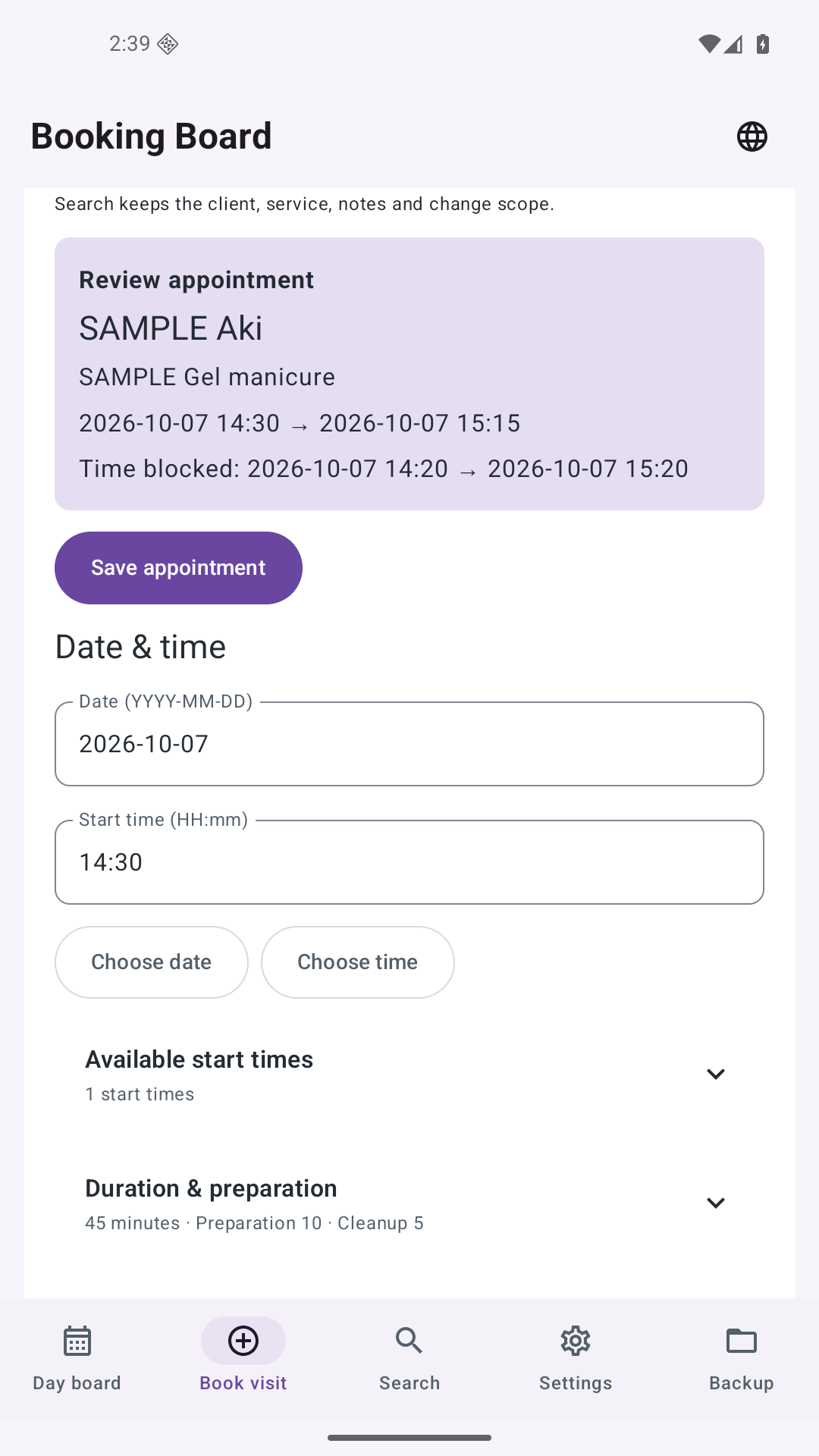
Review before saving, then prepare confirmation text to copy or share yourself.
02 / Screen tour
See the diary in action.
From today's schedule to the next visit, follow the key screens at your own pace.
Presented by the official Cairo-san avatar with synthetic narration. Narration and captions: English. App screens: English. Edited actual screens with fictional examples, not an uncut recording of taps. Recorded screen version: 1.2.2. Screens may differ from the current release; check current features and regional pricing on Google Play. Cairo-san avatar model: kh.
The official Cairo-san guides this edited original app-screen video. No audio. Captions: English. App screens: English. Fictional examples; not an uncut recording of taps. Historical screen version: 1.2.2. Check Google Play for current features and regional pricing. Cairo-san avatar model: kh.
01
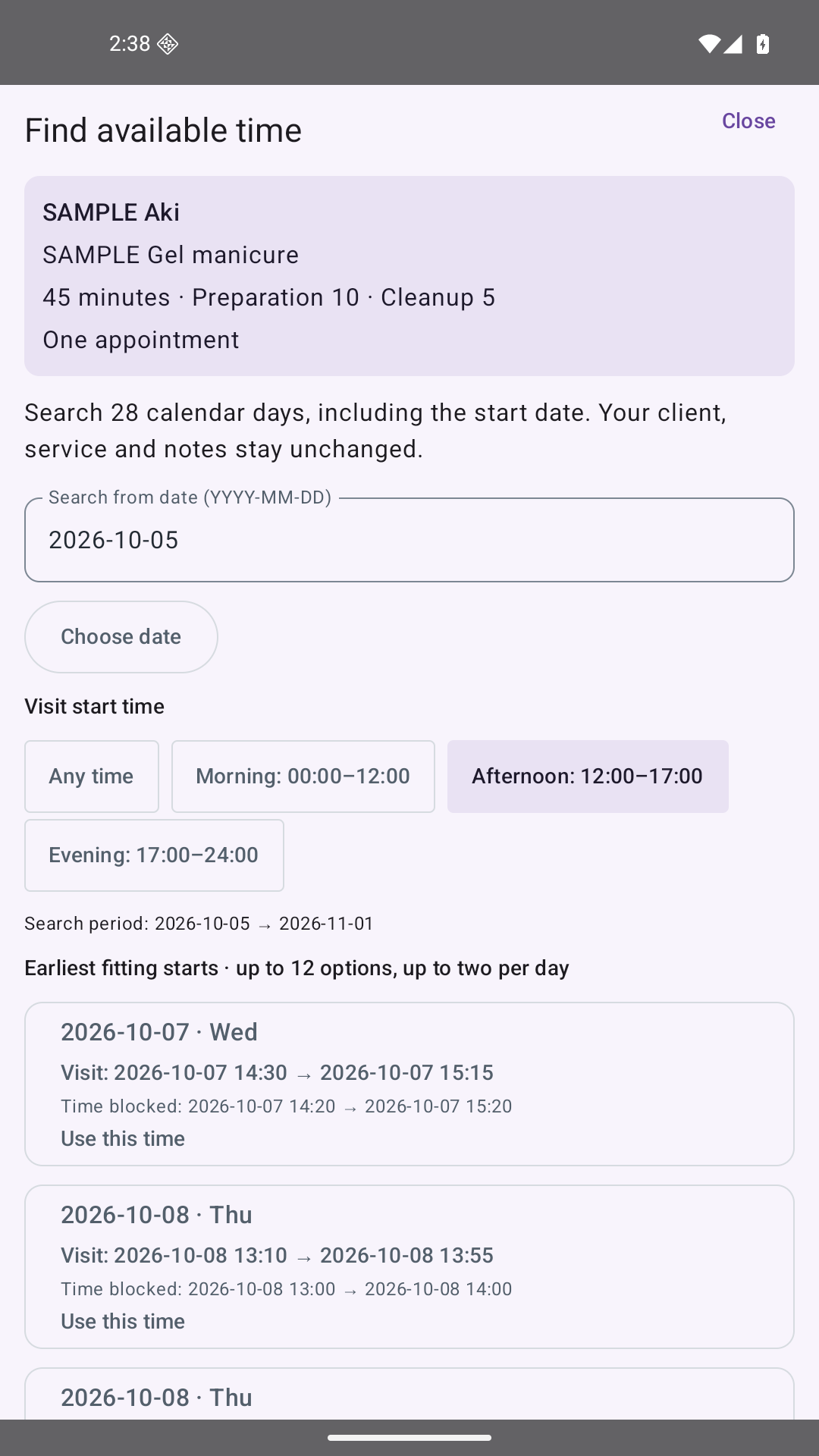
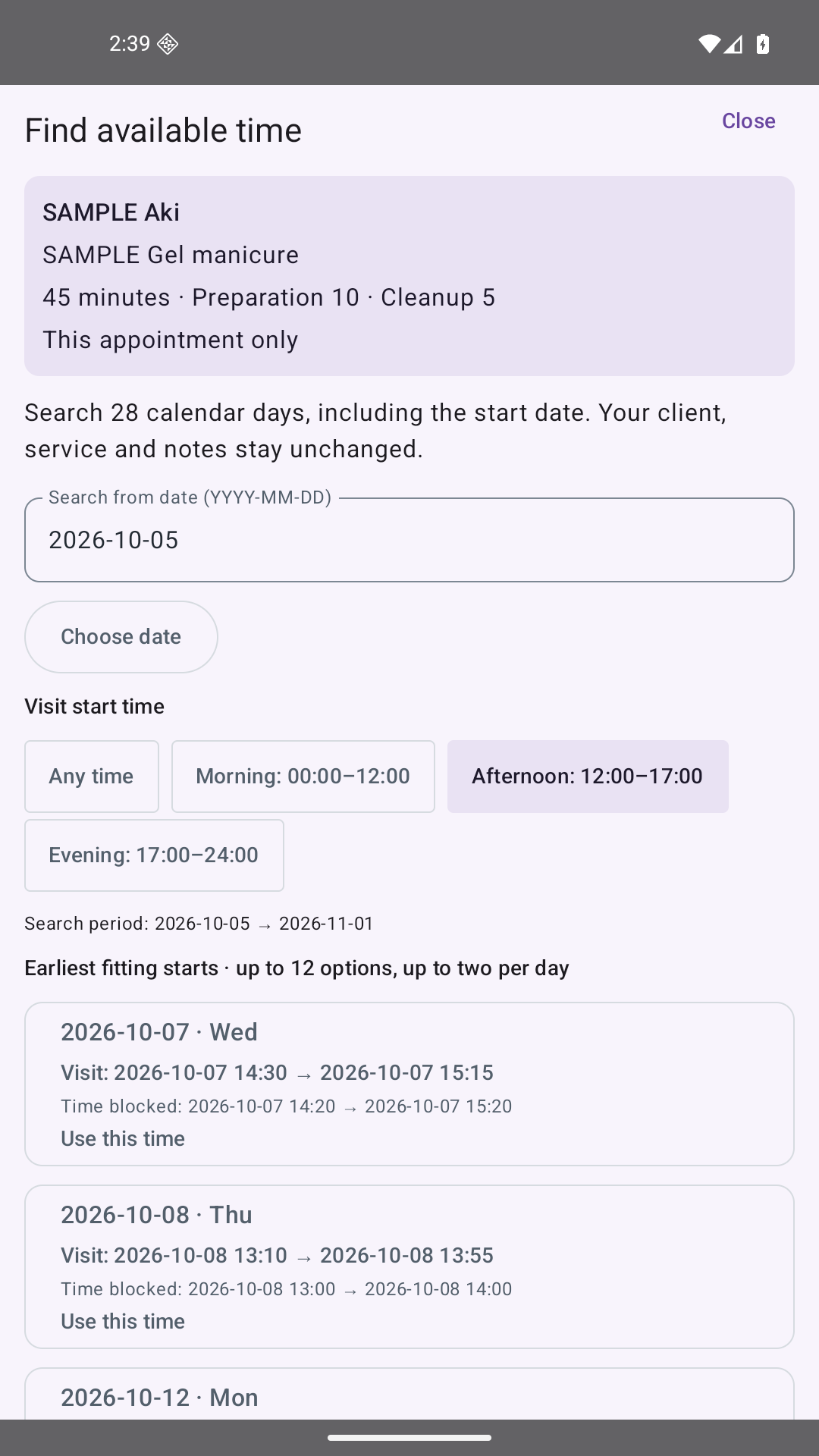
Find a time that fits the whole visit.
Search up to 28 calendar days and narrow the options to morning, afternoon or evening. Keep the client and service as you choose.
The official Cairo-san guides this edited original app-screen video. No audio. Captions: English. App screens: English. Fictional examples; not an uncut recording of taps. Historical screen version: 1.2.2. Check Google Play for current features and regional pricing. Cairo-san avatar model: kh.
02
A different time. The same details.
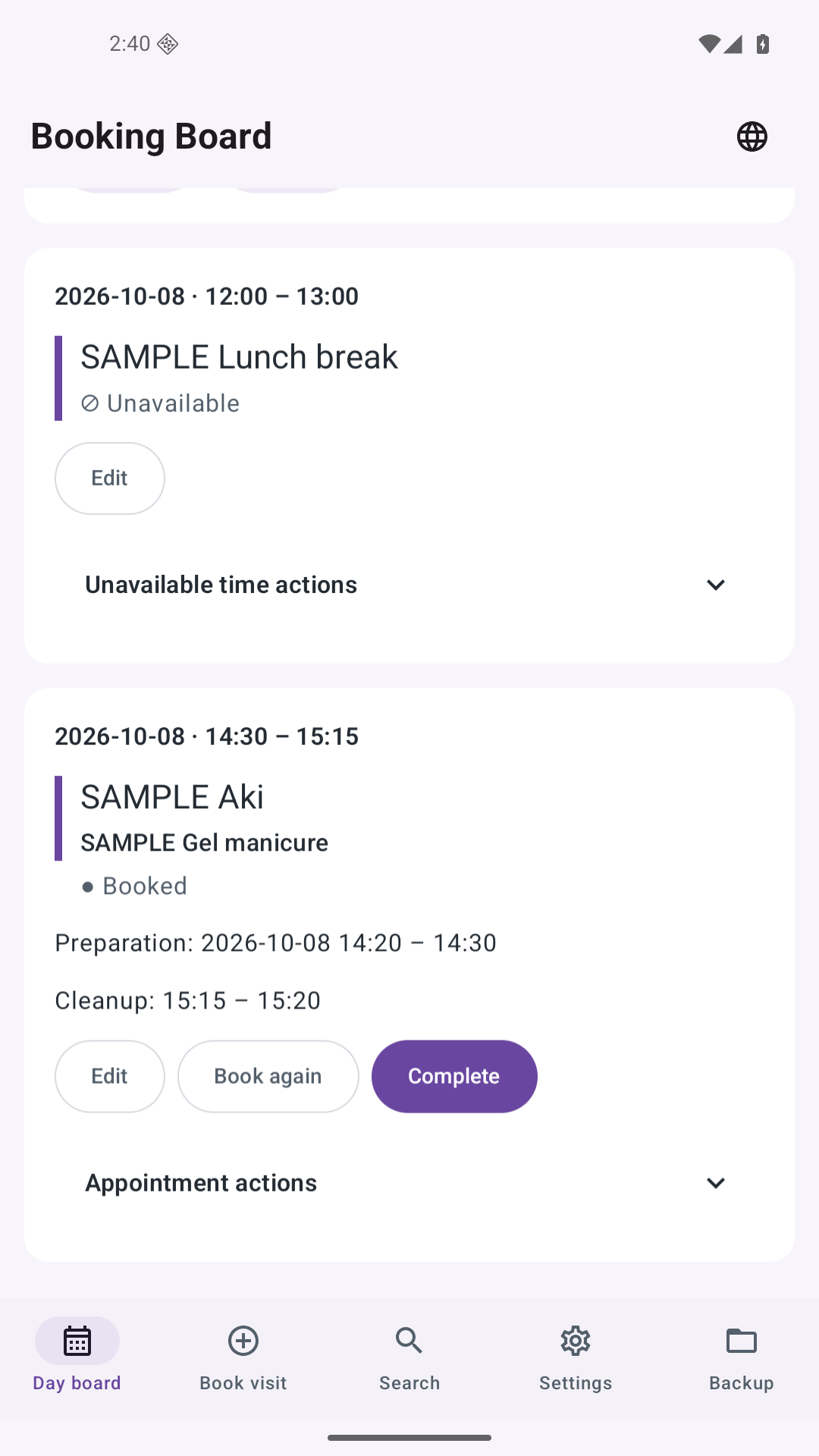
Move an appointment while keeping its client and service. For a linked series, choose this appointment or following booked appointments.
The official Cairo-san guides this edited original app-screen video. No audio. Captions: English. App screens: English. Fictional examples; not an uncut recording of taps. Historical screen version: 1.2.2. Check Google Play for current features and regional pricing. Cairo-san avatar model: kh.
03
Arrange the next visit before goodbye.
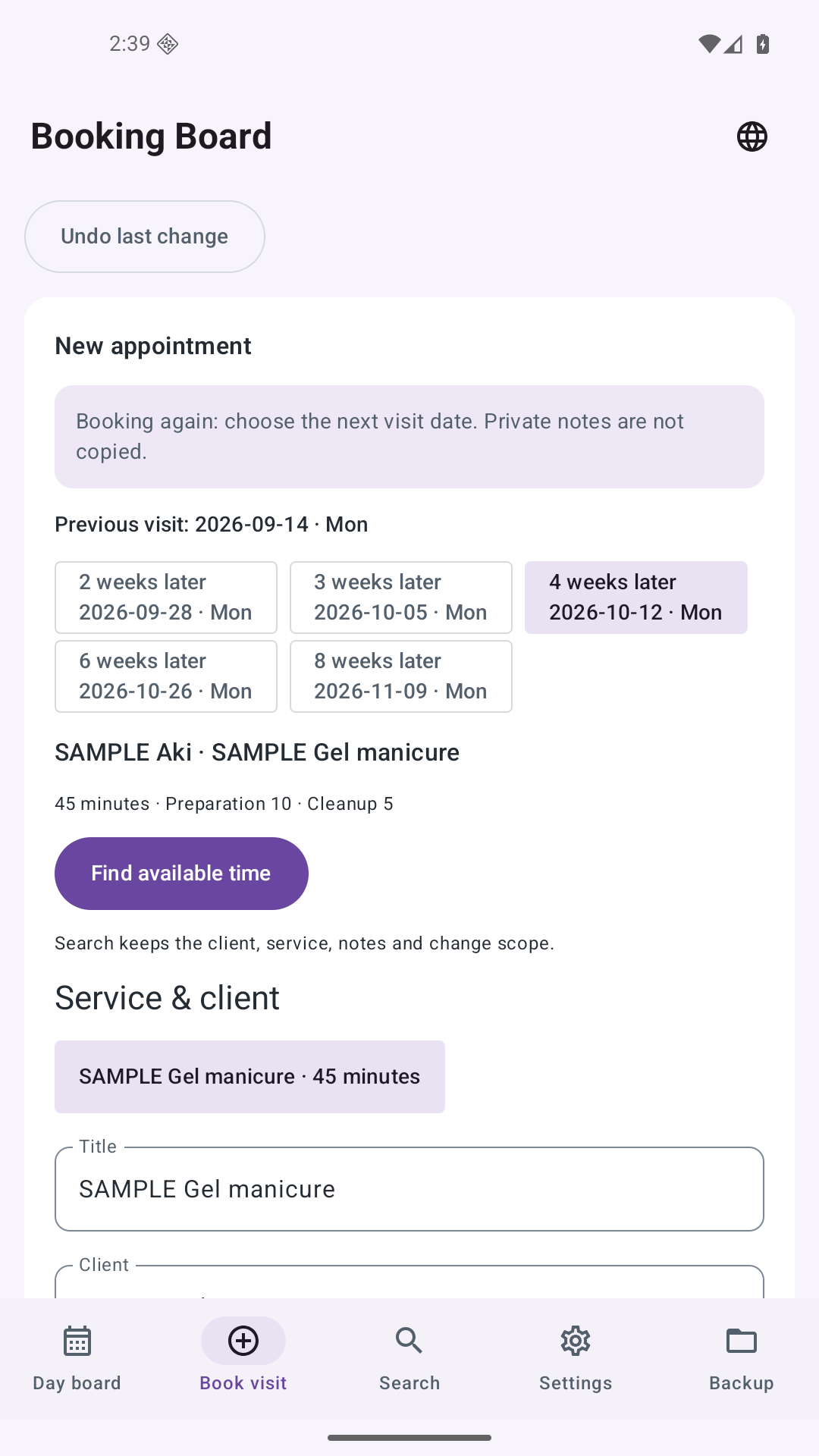
Start from a past visit, choose 2, 3, 4, 6 or 8 weeks later, then check the date and time before saving one next appointment.
03 / BOOKING BOARD
Take a closer look at the app.
Example salon scenario. All customer names and appointment details shown are fictitious.
The images and videos show the existing local booking features. They do not show the customer ledger, candidate review or Cloud screens introduced in 1.4.
Start from a past visit, choose 2, 3, 4, 6 or 8 weeks later, then check the date and time before saving one next appointment.
04 / Features
The useful details, close at hand.
01
Day and week views
See appointments and free time across your day or week.
02
Time around the service
Save service duration, preparation and cleanup together.
03
Breaks have their place
Block lunch breaks and unavailable time separately from client appointments.
04
History you can search
Find past appointments by client, service, notes or date.
05
Weekly repeat appointments
Check every appointment in a weekly series before saving.
06
Export and keep a copy
Review CSV or calendar files, and export a project for transfer to another phone.
07
See who is due to return
Record each customer's visit cycle, preferred days and times, contact details and consent. Review completed visits to find customers without a next booking. Candidate review and rebooking work locally.
08
Match an opening to a customer
Review candidates and make the next booking. With Optional Cloud, request email invitations only after checking recipients, content and their separate marketing consent. Email delivery and new bookings are not guaranteed.
09
Review the same diary on multiple devices
With an active Optional Cloud plan and setup, share bookings and customers across devices. Offline changes appear after synchronization; conflicting changes require review.
Booking Board / Pricing
Buy the app once. Add cloud when you need it.
The app purchase is required first. The local booking diary needs no monthly plan or account.
The booking app
Check current prices on Google Play
Japanese one-time price
Use the existing diary, availability search, appointment changes and rebooking on your device. Purchased local features and records remain usable without cloud. The US one-time price is USD 1.99.
Optional cloud
Check current prices on Google Play
Separate, automatically renewing subscription
Use the customer ledger and review return-visit and vacancy candidates on Android. Optional Cloud supports sharing across devices, owner-approved customer booking requests and email to customers who consent. The app is a one-time purchase. Optional Cloud is a separate automatically renewing subscription. Check Google Play and the in-app plan information for current local prices, availability, billing periods and allowances.
Use the service within the allowances shown in your plan. Check the in-app plan information for current limits, regions and conditions.
The app is a one-time purchase. Optional Cloud is a separate automatically renewing subscription. Check Google Play and the in-app plan information for current local prices, availability, billing periods and allowances.
Use the service within the allowances shown in your plan. Check the in-app plan information for current limits, regions and conditions.
How to start
Buy the app on Google Play and use the local diary.
Set opening hours and a service, then check how it fits your daily work.
If needed, check the account requirements, allowances and current price before subscribing to Optional Cloud.
Booking Board
Keep your local diary. Add cloud if useful.
The local ledger needs no account or monthly subscription and keeps its on-device records after Cloud cancellation. Cloud requires a separate active plan, account, connection and setup.
For a solo operator's bookings, return-visit candidates and available-time offers.
Cloud use requires optional account registration, a Google Play subscription, connectivity and setup.
Editing does not count the same booking twice. Cancellation does not refund used quota. Importing past completed history does not use the new-future-booking quota.
Appointment requests need store approval. Customer online payments are not supported.
Reservation-email consent and return-visit/available-time offer consent are separate. Review recipients and content before requesting sending. Delivery and bookings are not guaranteed.
Optional device reminders are for you, about 15 minutes before preparation. Android may delay them. This setting does not send customer email.
05 / FAQ
Before you begin
Can clients book online?
Customers can request a booking or time change on a public page. New bookings and time changes become confirmed only after owner approval. Per-booking change and cancellation links are supported. There are no online payments.
Does it send messages to clients?
Optional Cloud supports confirmation email and reminders about 24 hours before a booking for customers who consent to booking messages. Return-visit and vacancy invitations require separate consent and an owner check of recipients and content. Private notes are excluded.
What happens when I change phones?
Export an appointment project on the old phone. If you use the customer directory, also save its separate JSON backup. Import both on the new phone to restore bookings, services, opening settings, customer identifiers and links. Device-only snapshots do not protect against losing the device. Cloud sharing is not a backup of every setting or undo history. Exports contain customer information.
Does calendar export keep everything in sync?
It creates a file; it is not ongoing synchronization and cannot remove events imported earlier. Appointment exports contain the service time without preparation or cleanup and exclude cancelled appointments.
Which languages are supported?
The Android app supports English, Japanese, German, Korean, French, Spanish, Brazilian Portuguese, Italian, Traditional Chinese and Dutch. The additional service's customer booking and management pages support Japanese and English; other settings use English.
Do I need both the app and a subscription?
The app is a one-time purchase. Optional Cloud is a separate automatically renewing subscription. Check Google Play and the in-app plan information for current local prices, availability, billing periods and allowances.
Will cancellation erase my diary?
Existing local features and device appointment/customer records remain. Cloud access normally lasts to the end of the paid period; sharing, public requests and sending then require a valid subscription. Cancellation alone does not delete cloud data. Account deletion is separate and does not cancel Google Play billing, nor does uninstalling the app.
▦
Make room for the next visit.
Use the customer ledger and review return-visit and vacancy candidates on Android. Optional Cloud supports sharing across devices, owner-approved customer booking requests and email to customers who consent. The app is a one-time purchase. Optional Cloud is a separate automatically renewing subscription. Check Google Play and the in-app plan information for current local prices, availability, billing periods and allowances.
The app is a one-time purchase. Optional Cloud is a separate automatically renewing subscription. Check Google Play and the in-app plan information for current local prices, availability, billing periods and allowances.
Cairo-san introduces the app
Review reservations, find available time including preparation and cleanup, change plans and book the next visit, introduced in English.
Presented by an AI avatar with synthetic narration. Edited app screens and fictional examples; this is not a continuous recording of tap operations.
Narration and subtitles: English. App screens: English.
Review the features and limits on this page, then check the current price and availability on Google Play before buying.
Cairo-san avatar model: kh
Booking Board
Questions before you buy?
About page usage
With your consent, we count page views, video plays, sample file openings, clicks to Google Play and successful inquiry submissions (without their content) to improve this page. Results are grouped by app, display language and broad traffic source. Names, email addresses, inquiry content, full URLs and IP addresses are not stored in the analytics data. We do not use cookies to identify individuals for this measurement. These actions do not indicate completed purchases. Your choice is saved in this browser and can be changed at any time.
May we collect anonymous usage statistics to improve this page?